
Sample Application
Sample application using OAuth 2.0
Overview
This simple application, built with Python and Flask, illustrates how to use OAuth 2.0 and its authorization token workflow. Note that this is a demonstration app and does not follow standard token security practices.
Setting up the environment
First, we'll use python's venv to create a lightweight virtual environment for our project:
python3 -m venv .venvAfter python sets up the environment, activate it:
source .venv/bin/activateThen install the flask and requests libraries:
pip install flask requestsCreating the Application
Create a file named app.py:
vi app.pyCreate a flask application.
from flask import Flask

app = Flask(__name__)
app.secret_key = "<SECRET>"

@app.get("/")
def index():
    return "Hello!"

if __name__ == "__main__":
    app.run()
Run the current application.
python3 app.pyYour application should now be running on port 5000.
 * Serving Flask app 'app' (lazy loading)
 * Environment: development
 * Debug mode: on
 * Running on http://127.0.0.1:5000/ (Press CTRL+C to quit)
 * Restarting with stat
Navigate to http://localhost:5000/ and confirm you get the "Hello!" response.
Authorizing the Application using Carta's OAuth
Next, we'll confirm that the app can authenticate using Carta's OAuth process. Update app.py with the code below, and change the CLIENT_ID and CLIENT_SECRET variables to the client_id and client_secret strings from your playground app.
from hashlib import sha256
from os import urandom
from urllib.parse import urlencode
from flask import Flask, redirect, session, url_for
import requests

app = Flask(__name__)
app.secret_key = "<SECRET>"

CLIENT_ID = "<REPLACE_THIS_WITH_YOUR_CARTA_OAUTH_APP_CLIENT_ID>"
CLIENT_SECRET = "<REPLACE_THIS_WITH_YOUR_CARTA_OAUTH_APP_CLIENT_SECRET>"
BASE_AUTH_URL = "https://login.playground.carta.team"
BASE_API_URL = "https://api.playground.carta.team"
SCOPES_REQUESTS = ["read_issuer_info", "read_issuer_securities"]

@app.get("/")
def index():
    return "Hello!"


@app.get("/carta/connect")
def connect():
    state = sha256(urandom(1024)).hexdigest()
    session["state"] = state
    params = {
        "response_type": "code",
        "client_id": CLIENT_ID,
        "scope": " ".join(SCOPES_REQUESTS),
        "redirect_uri": url_for("callback", _external=True),
        "state": state,
    }

    url = f"{BASE_AUTH_URL}/o/authorize?{urlencode(params)}"
    return redirect(url)

@app.get("/carta/callback")
def callback():
    return "Callback"

if __name__ == "__main__":
    app.run()
We added two new endpoints to our application:
/carta/connect- This endpoint builds the authorization url and redirects the user to Carta's authorization page./carta/callback- After the user grants access, Carta redirects the user back to this endpoint.
NoteMake sure that the application runs and that you successfully get redirected to Carta authorization page when navigating to
http://localhost:5000/carta/connect.
Generating an access token
Once the user has authorized the application, Carta will redirect the user's browser to the specified redirect_uri with the authorization code (specified as code) and the state parameter.
from hashlib import sha256
from os import urandom
from uuid import uuid4
from urllib.parse import urlencode
from flask import Flask, redirect, session, url_for, request
import requests
from requests.auth import HTTPBasicAuth

app = Flask(__name__)
app.secret_key = "<SECRET>"

CLIENT_ID = "<REPLACE_THIS_WITH_YOUR_CARTA_OAUTH_APP_CLIENT_ID>"
CLIENT_SECRET = "<REPLACE_THIS_WITH_YOUR_CARTA_OAUTH_APP_CLIENT_SECRET>"
BASE_AUTH_URL = "https://login.playground.carta.team"
BASE_API_URL = "https://api.playground.carta.team"
SCOPES_REQUESTS = ["read_issuer_info", "read_issuer_securities"]

# In memory database to store the generated access_token for each session
SESSION_ID_TO_ACCESS_TOKEN_DB = {}

@app.get("/")
def index():
    return "Hello!"


@app.get("/carta/connect")
def connect():
    state = sha256(urandom(1024)).hexdigest()
    session["state"] = state
    params = {
        "response_type": "code",
        "client_id": CLIENT_ID,
        "scope": " ".join(SCOPES_REQUESTS),
        "redirect_uri": url_for("callback", _external=True),
        "state": state,
    }

    url = f"{BASE_AUTH_URL}/o/authorize?{urlencode(params)}"
    return redirect(url)

@app.get("/carta/callback")
def callback():
    code = request.args.get("code")
    state = request.args.get("state")
    if code and state and state == session["state"]:
        token_url = f"{BASE_AUTH_URL}/o/access_token/"
        auth = HTTPBasicAuth(CLIENT_ID, CLIENT_SECRET)
        data = {
            "grant_type": "authorization_code",
            "code": code,
            "redirect_uri": url_for("callback", _external=True),
            "client_id": CLIENT_ID,
        }
        resp = requests.post(token_url, data=data, auth=auth)
        if resp.ok:
            token_resp = resp.json()
            session_id = str(uuid4())
            SESSION_ID_TO_ACCESS_TOKEN_DB[session_id] = token_resp["access_token"]
            session["session_id"] = session_id
            return redirect(url_for("index"))
        return resp.json()
    return f"Failed: {request.args.to_dict()}"

if __name__ == "__main__":
    app.run()
We have updated the callback endpoint to perform the following steps:
- Verify that
stateparameter matches thestatewe saved in our session store when theconnectrequest was initiated. - Exchange the
codefor anaccess_tokenusing Carta's/o/access_tokenendpoint. - If the exchange is successful:
- Create a unique
session_idusinguuid4(). - Save
session_id->access_tokenmapping in theSESSION_ID_TO_ACCESS_TOKEN_DB. - Store
session_idin the current session. - Redirect the user to the index page (
http://localhost:5000).
- Create a unique
Do not save tokens within a user-agentWhen implementing your integration, never store the access token or refresh token within a user-agent.
Using the API
Finally, we will update the index endpoint to use the access_token we generated in the previous step to connect with Carta's ListIssuers API:
from hashlib import sha256
from os import urandom
from uuid import uuid4
from urllib.parse import urlencode
from flask import Flask, redirect, session, url_for, request
import requests
from requests.auth import HTTPBasicAuth

app = Flask(__name__)
app.secret_key = "<SECRET>"

CLIENT_ID = "<REPLACE_THIS_WITH_YOUR_CARTA_OAUTH_APP_CLIENT_ID>"
CLIENT_SECRET = "<REPLACE_THIS_WITH_YOUR_CARTA_OAUTH_APP_CLIENT_SECRET>"
BASE_AUTH_URL = "https://login.playground.carta.team"
BASE_API_URL = "https://api.playground.carta.team"
SCOPES_REQUESTS = ["read_issuer_info", "read_issuer_securities"]

# In memory database to store the generated access_token for each session
SESSION_ID_TO_ACCESS_TOKEN_DB = {}

@app.get("/")
def index():
    session_id = session.get("session_id")
    access_token = SESSION_ID_TO_ACCESS_TOKEN_DB.get(session_id)
    if access_token:
        url = f"{BASE_API_URL}/v1alpha1/issuers"
        resp = requests.get(url, headers={"authorization": f"Bearer {access_token}"})
        if resp.ok:
            return resp.json()
        del session["access_token"]
    return redirect(url_for("connect"))


@app.get("/carta/connect")
def connect():
    state = sha256(urandom(1024)).hexdigest()
    session["state"] = state
    params = {
        "response_type": "code",
        "client_id": CLIENT_ID,
        "scope": " ".join(SCOPES_REQUESTS),
        "redirect_uri": url_for("callback", _external=True),
        "state": state,
    }

    url = f"{BASE_AUTH_URL}/o/authorize?{urlencode(params)}"
    return redirect(url)

@app.get("/carta/callback")
def callback():
    code = request.args.get("code")
    state = request.args.get("state")
    if code and state and state == session["state"]:
        token_url = f"{BASE_AUTH_URL}/o/access_token/"
        auth = HTTPBasicAuth(CLIENT_ID, CLIENT_SECRET)
        data = {
            "grant_type": "authorization_code",
            "code": code,
            "redirect_uri": url_for("callback", _external=True),
            "client_id": CLIENT_ID,
        }
        resp = requests.post(token_url, data=data, auth=auth)
        if resp.ok:
            token_resp = resp.json()
            session_id = str(uuid4())
            SESSION_ID_TO_ACCESS_TOKEN_DB[session_id] = token_resp["access_token"]
            session["session_id"] = session_id
            return redirect(url_for("index"))
        return resp.json()
    return f"Failed: {request.args.to_dict()}"

if __name__ == "__main__":
    app.run()
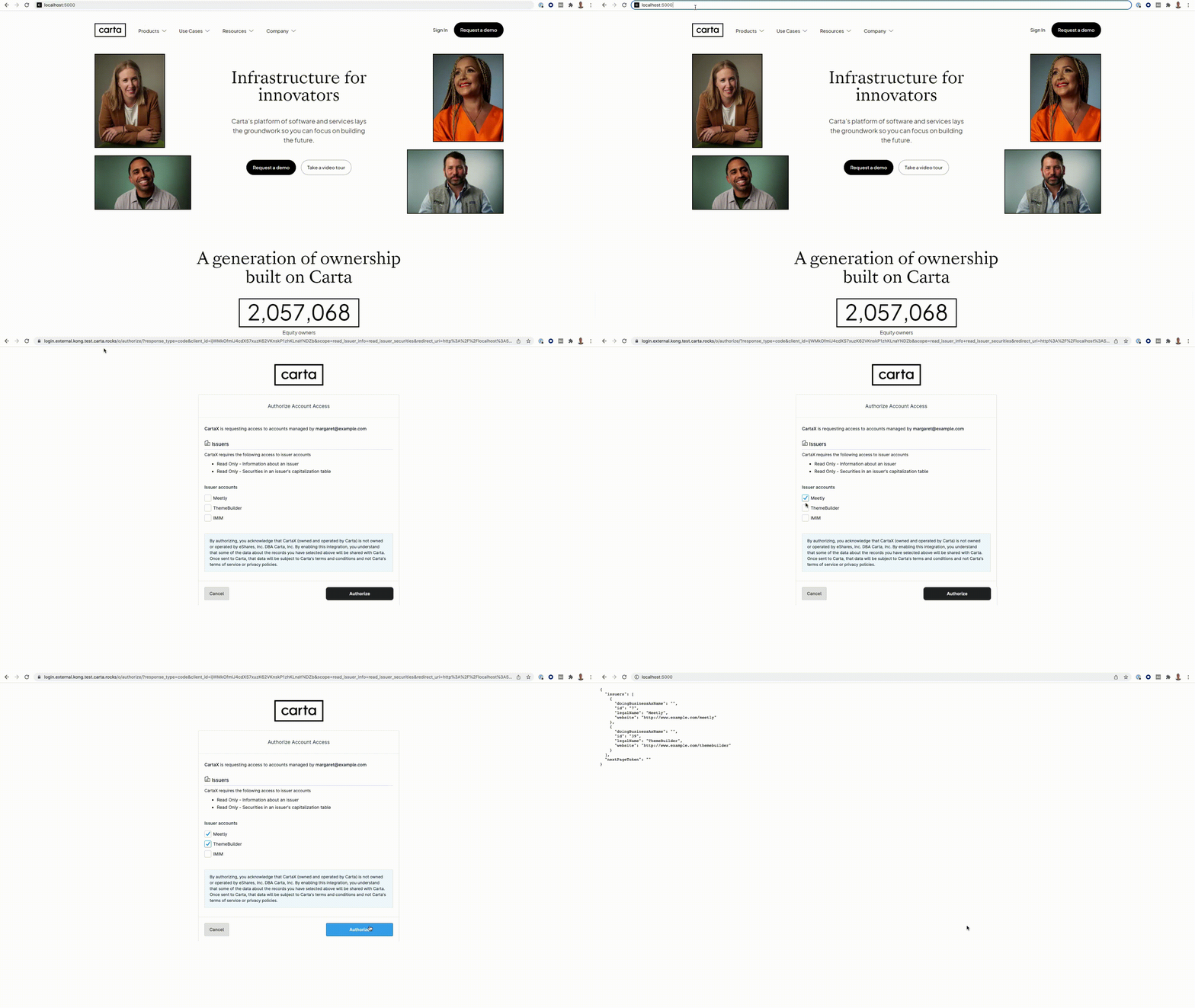
In our final version, we have modified the index endpoint to first check if an access_token is available in the SESSION_ID_TO_ACCESS_TOKEN_DB. If so, the app submits a request to Carta's API using that token. If the request fails or no access_token is available, the user is redirected to the connect endpoint to start Carta's authorization process.
Updated 5 months ago