
Connect your Carta data warehouse to an external system
This guide outlines how to query your data in Carta’s Snowflake account using the Snowflake Python connector.
Generate a private key
PermissionsPlease note that the private key you generate will map to your Carta account's permissions and only include the data sets that you have access to in Carta.
- Login to your Carta account.
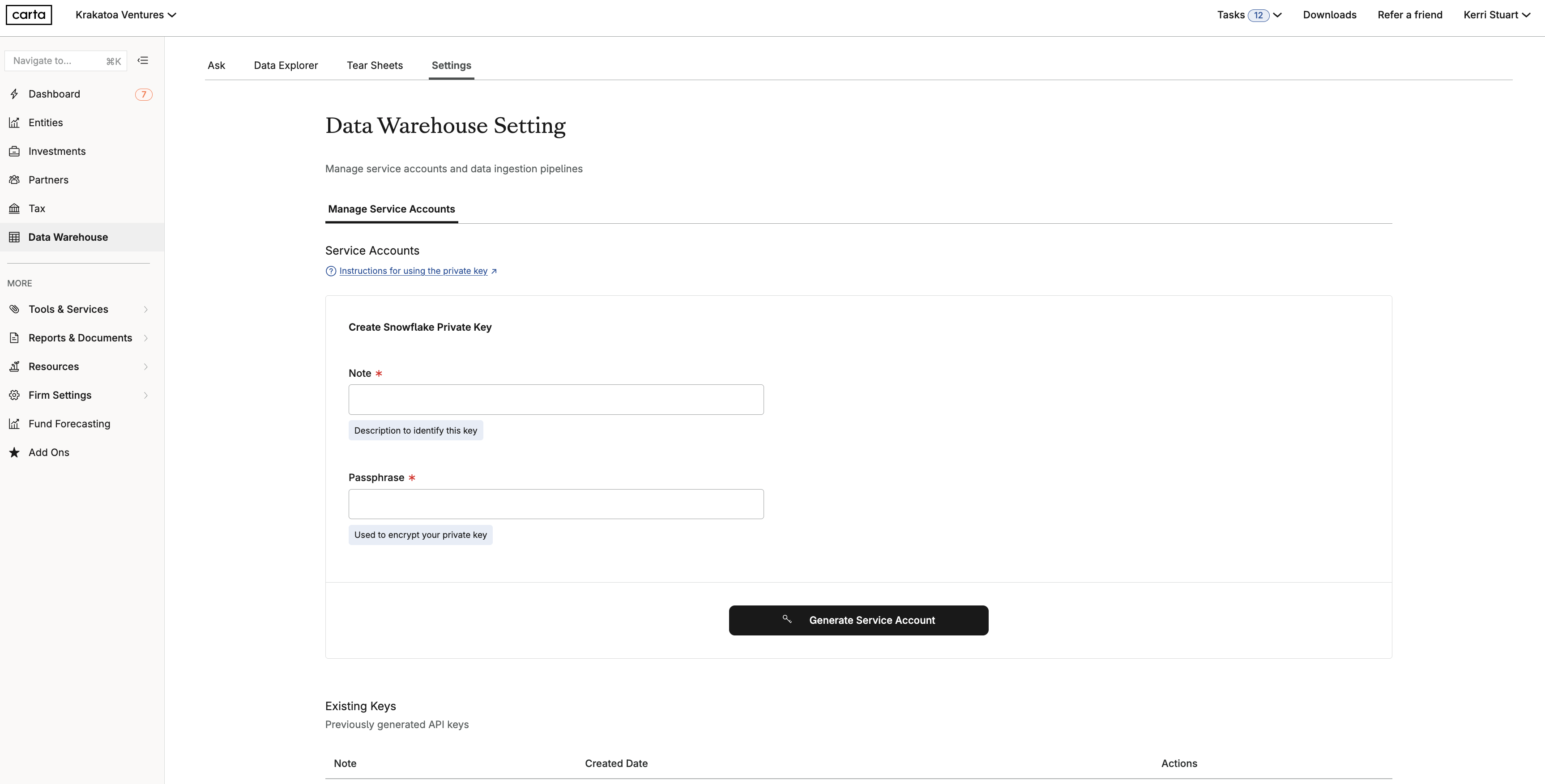
- Go to Data Warehouse > Settings
- Type in a Note and Passphrase and click Generate Service Account
- You will see a pop-up window. Copy and securely save the Passphrase and Private Key as these will not be shown again.
Avoid sharing your account credentials outside your organizationEnsure to securely store and never share your passphrase and private keys outside of your organization.
Setup the integration
1. Prerequisites
-
Private Key: Create an
rsa_key.p8file containing the Private Key you generated in Carta. -
Install Dependencies: Run the following command to install the Snowflake Python connector and cryptography library:
pip install snowflake-connector-python cryptography
2. Environment Configuration
Export the following environment variables in your terminal. Ensure you replace the placeholder values with your specific account details and the correct path to your rsa_key.p8 file .
export SNOWFLAKE_ACCOUNT="sqozivc-bkb57933"
export SNOWFLAKE_USER="<your_email>"
export SNOWFLAKE_PRIVATE_KEY_PATH="</path/to/your/private/key/rsa_key.p8>"
export SNOWFLAKE_PRIVATE_KEY_PASSPHRASE="<your_passphrase>"
export SNOWFLAKE_WAREHOUSE="PROD_DATA_EXPLORER_WH"
export SNOWFLAKE_DATABASE="PROD_DATA_EXPLORER_DB"
export SNOWFLAKE_SCHEMA="FUND_ADMIN"
3. Python Implementation
Save the following code as carta_snowflake.py.
import snowflake.connector
from cryptography.hazmat.backends import default_backend
from cryptography.hazmat.primitives import serialization
import os

# --- Configuration ---
# Carta's Snowflake Account
SNOWFLAKE_ACCOUNT = os.getenv("SNOWFLAKE_ACCOUNT")
# Snowflake Service Account
SNOWFLAKE_USER = os.getenv("SNOWFLAKE_USER")
# Path to your private key file (e.g., '/path/to/rsa_key.p8')
PRIVATE_KEY_PATH = os.getenv("SNOWFLAKE_PRIVATE_KEY_PATH")
# Private key passphrase sent in 1Password entry
PRIVATE_KEY_PASSPHRASE = os.getenv("SNOWFLAKE_PRIVATE_KEY_PASSPHRASE")
# Default Snowflake warehouse, database, and schema to connect to
SNOWFLAKE_WAREHOUSE = os.getenv("SNOWFLAKE_WAREHOUSE")
SNOWFLAKE_DATABASE = os.getenv("SNOWFLAKE_DATABASE")
SNOWFLAKE_SCHEMA = os.getenv("SNOWFLAKE_SCHEMA")
# Optional: Snowflake role to use (if not set, uses user's default role)
SNOWFLAKE_ROLE = os.getenv("SNOWFLAKE_ROLE")

def connect_to_snowflake_keypair():
    """
    Connects to Snowflake using key pair authentication with a passphrase.
    """
    conn = None
    try:
        # 1. Load the private key
        if not os.path.exists(PRIVATE_KEY_PATH):
            print(f"Error: Private key file not found at '{PRIVATE_KEY_PATH}'")
            return None

        with open(PRIVATE_KEY_PATH, "rb") as key:
            p_key = serialization.load_pem_private_key(
                key.read(),
                password=(
                    PRIVATE_KEY_PASSPHRASE.encode() if PRIVATE_KEY_PASSPHRASE else None
                ),
                backend=default_backend(),
            )

        # Convert the private key to DER format for the Snowflake connector
        pkb = p_key.private_bytes(
            encoding=serialization.Encoding.DER,
            format=serialization.PrivateFormat.PKCS8,
            encryption_algorithm=serialization.NoEncryption(),
        )

        # 2. Establish the Snowflake connection
        print(f"Attempting to connect to Snowflake as user '{SNOWFLAKE_USER}'...")
        connect_args = {
            "user": SNOWFLAKE_USER,
            "account": SNOWFLAKE_ACCOUNT,
            "private_key": pkb,
            "warehouse": SNOWFLAKE_WAREHOUSE,
            "database": SNOWFLAKE_DATABASE,
            "schema": SNOWFLAKE_SCHEMA,
        }
        if SNOWFLAKE_ROLE:
            connect_args["role"] = SNOWFLAKE_ROLE

        conn = snowflake.connector.connect(**connect_args)
        print("Successfully connected to Snowflake!")

        # 3. Execute a simple query to verify the connection
        cursor = conn.cursor()
        try:
            cursor.execute("SELECT current_version()")
            one_row = cursor.fetchone()
            print(f"Snowflake Version: {one_row[0]}")

            cursor.execute("SELECT current_user()")
            current_user = cursor.fetchone()
            print(f"Connected as user: {current_user[0]}")

            for schema in ["FUND_ADMIN", "LOAN_OPS"]:
                cursor.execute(f"SHOW VIEWS IN SCHEMA {SNOWFLAKE_DATABASE}.{schema}")
                views = cursor.fetchall()
                print(f"\nViews in {SNOWFLAKE_DATABASE}.{schema}:")
                for view in views:
                    cursor.execute(f"SELECT count(*) FROM {schema}.{view[1]}")
                    results = cursor.fetchone()
                    print(f"  - {view[1]} ({results[0]} rows)")
        finally:
            if cursor:
                cursor.close()

        return conn

    except Exception as e:
        print(f"An error occurred during Snowflake connection: {e}")
        return None

# --- Main execution ---
if __name__ == "__main__":
    snowflake_connection = connect_to_snowflake_keypair()

    if snowflake_connection:
        print("\nClosing Snowflake connection.")
        snowflake_connection.close()
    else:
        print("\nFailed to establish Snowflake connection.")
4. Execution
To run the integration script, use:
python carta_snowflake.py
Updated about 1 month ago